Advanced Troubleshooting: Common Certificate Errors and Fixes
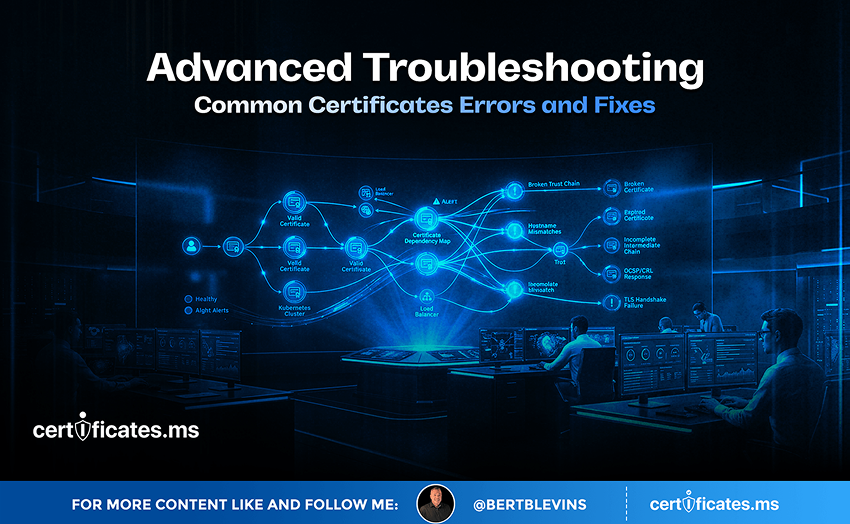
Certificate errors have a reputation for being cryptic, throwing up messages like unable to verify the first certificate or certificate name mismatch that tell an administrator something is wrong without explaining exactly what. This article works through the most common certificate errors encountered in real production environments, what actually causes each one, and how to fix it efficiently rather than through trial and error.
Incomplete Certificate Chain
The single most common certificate error in production is a server presenting its end-entity certificate without the accompanying intermediate certificate, causing clients that lack that intermediate cached locally to fail chain validation entirely, even though the end-entity certificate itself is perfectly valid. This is diagnosed quickly by checking the server’s TLS configuration against an independent chain-checking tool rather than a single browser, since some browsers cache common intermediates and will validate successfully even with an incomplete server-side configuration, masking the underlying problem. The fix is straightforward: ensure the server configuration includes the full intermediate chain, in the correct order, alongside the end-entity certificate.
Certificate Name Mismatch
A name mismatch error occurs when the hostname a client is connecting to does not appear in the certificate’s Subject Alternative Names. This commonly happens after an application is accessed through a new hostname, a load balancer configuration change routes traffic differently than expected, or a certificate was issued for the wrong set of domains in the first place. Diagnosing this requires comparing the exact hostname in the connection request against the certificate’s actual SAN list, which can be checked directly through browser certificate viewers or command-line tools, and the fix is reissuing the certificate with the correct, complete set of hostnames.
Expired Certificates
An expired certificate produces one of the more unambiguous errors, but the underlying cause is almost always process failure rather than a technical mystery: a renewal that was supposed to happen automatically did not, or a manual renewal was simply missed. Beyond the immediate fix of issuing a new certificate, the more important response is auditing why the renewal did not happen, whether that means a broken automation script, an unnoticed rate limit, or a genuinely manual process that had no safety net, and correcting that underlying gap rather than treating the expiration as an isolated incident.
Self-Signed or Untrusted Certificate Authority Errors
This error appears when a client encounters a certificate that does not chain back to any root the client already trusts, commonly because a self-signed certificate is being used where a properly issued one should be, or because an internal CA’s root certificate has not been distributed and installed on the client encountering the error. The fix depends on the cause: replacing a self-signed certificate with a properly issued one from an appropriate CA, or ensuring the private CA’s root is correctly installed in the client’s trust store if the certificate is legitimately internal.
Clock Skew and Time-Related Validation Failures
Certificate validity is checked against the client’s own system clock, and a device with significantly incorrect time settings can reject a perfectly valid, currently active certificate as either not yet valid or already expired, purely due to its own clock being wrong. This is a surprisingly common and easily overlooked cause of certificate errors on devices with unreliable time synchronization, particularly IoT devices or systems that have lost network time protocol connectivity, and the fix lies in correcting the device’s clock rather than anything related to the certificate itself.
Weak Cipher Suite or Protocol Negotiation Failures
Some connection failures are not certificate problems at all but protocol negotiation failures, where a client and server cannot agree on a mutually supported TLS version or cipher suite, often because one side has been hardened to reject older, insecure options the other side still expects. Diagnosing this requires checking the actual negotiated protocol version and cipher suite on both ends rather than assuming a certificate issue, and the fix typically involves updating the outdated end, whether client or server, to support current TLS standards rather than weakening the more modern side’s security posture to accommodate it.
Troubleshooting Certificate Issues in AI-Driven Pipelines
Automated, AI-driven infrastructure introduces its own flavor of certificate troubleshooting challenge: an error occurring deep inside an automated pipeline, with no human directly watching the failure happen in real time, can go unnoticed considerably longer than an error a user directly encounters and reports. Building explicit certificate validation checks and clear error logging into any AI agent or pipeline making outbound TLS connections is essential specifically because the usual human-in-the-loop discovery path, someone noticing a browser warning, does not exist in a fully automated system.
The Countdown Is Already Running: 200 Days, 100 Days, 47 Days
Every certificate conversation in 2026 eventually arrives at the same clock, and it is worth closing on it here. The CA/Browser Forum’s Ballot SC-081v3 is not a proposal under discussion; it is an approved, already-in-motion schedule. Maximum public TLS certificate lifetimes fall from 398 days to 200 days on March 15, 2026. They fall again to 100 days on March 15, 2027. By March 15, 2029, they drop to just 47 days, with domain validation itself needing to be re-proven roughly every 10 days.
Translate that into operational terms and the picture gets stark quickly. An organization currently renewing certificates a few times a year will be handling renewal events on the order of every couple of weeks by the end of this countdown, across every endpoint it operates. Manual tracking, calendar reminders, and a spreadsheet somebody checks once a month will not survive contact with that cadence. What has always been an occasional chore is becoming a continuous, automated operation, whether an organization plans for it or not.
As renewal frequency climbs under the shrinking lifetime schedule below, several of the errors covered above, particularly expired certificates and failed automated renewals, will happen far more often unless the underlying automation gaps are closed well before maximum lifetimes reach 47 days.
The 200-day, 100-day, and 47-day milestones are not distant hypotheticals; the first has already arrived. Organizations that build the automation loop now, generating keys, vaulting them securely, brokering issuance across Certificate Authorities through APIs, and rebinding certificates to live endpoints without manual intervention, will meet each deadline without disruption. Organizations that wait will be rebuilding their certificate operations under deadline pressure, with far less room for error and far less time to get it right. The countdown is the call to action. The only real decision left is whether to automate on your own schedule, or on the CA/Browser Forum’s.